Custom AI & Workflow Automation

Automate the work your team keeps doing by hand.

I map the workflow first, then build practical automation and AI-assisted systems that reduce repetitive admin, connect your tools, and keep work moving. No generic AI layer. Just a clearer way for the work to flow.

You do not need a technical brief. Mapping the process is part of the work.

A calmer operating rhythm

From scattered inputs to work that moves.

01Enquiry or brief arrives
02Information is captured once
03Rules route the next action
04AI helps where judgement is useful
05People see what needs attention

The right system makes ownership visible without asking your team to remember every next step.

Where the friction starts

The work between the work.

The problem is rarely that your team is not working hard enough. It is that too much of the important work lives in the gaps between tools, people and decisions.

You might recognise this

Not sure what to automate?

That is a useful place to start. Bring the messy version: what arrives, who touches it, what gets repeated, and where things go quiet. I will help map the opportunity.

  • Information copied manually between tools
  • An inbox quietly acting as the operating system
  • Repeated processing that depends on one person
  • Follow-ups that live in memory and good intentions
  • Recurring reporting that takes hours to assemble
  • Tools that still rely on people to connect them
Lead & enquiry workflowsCapture the right context, route opportunities, create records and make the next step visible.
Client onboardingTurn forms, files, updates and reminders into a sequence that does not need constant chasing.
Documents & information processingOrganise briefs, notes, documents and incoming information so useful detail is easier to find and act on.
Internal operations & handoffsClarify ownership, statuses, approvals and the small transitions where momentum is often lost.
Reporting & dashboardsBring recurring inputs together so decisions are based on a current view, not a last-minute spreadsheet.
Custom AI-assisted workflowsUse AI selectively for classification, summaries, drafted responses and other places where unstructured information needs a first pass.
A better handoff

Same business.
Fewer manual steps.

The goal is not to make your business feel like software. It is to remove the invisible admin that keeps pulling people away from the work only they can do.

Before · manual flow

The handoff gets lost.

01 Inbox02 Copy details03 Find the right doc04 Ask who owns it05 Remember to follow up

After · connected flow

The next action is clear.

01 Capture02 Route03 Review04 Handover

Rules handle the predictable sequence. People spend their attention where a decision is actually needed.

Method + judgement

Simple systems are easier to trust.

I do not add AI because a workflow page says it should be there. I look at the shape of the work, then choose the simplest reliable solution that gives your team a better next step.

The distinction matters

Automation where rules work.
AI where judgement helps.

Standard automation is best for predictable actions: moving data, creating records, updating statuses, sending notifications and triggering follow-ups. AI helps when the input is less tidy: briefs, enquiries, documents, notes, classification, summaries and drafted responses.

Rules

Consistent, visible, testable actions that should happen the same way every time.

Judgement

A useful first pass over information that needs interpretation before a person decides.

01MapUnderstand the current process, people, tools, friction and edge cases.
02DesignShape the stages, ownership, inputs, rules and useful moments for assistance.
03BuildConnect the right tools and create a practical system your team can actually use.
04TestRun real scenarios, including the awkward exceptions that make systems fail.
05HandoverDocument the flow, explain the decisions and leave the team able to own it.

Ways to work together

Start with the workflow that matters most.

Clear starting points for a focused improvement, a defined build or a broader operational system.

01 · Find the opportunity

Workflow Audit & Automation Blueprint

£350 fixed

For one workflow. Includes bottleneck mapping, automation opportunities and a prioritised implementation plan. The £350 can be credited against an implementation booked within 30 days.

Discuss an audit

03 · Connect the wider system

Custom AI & Workflow Implementation

From £3,500

For larger processes across multiple tools, people or automation stages, where the system needs more considered design and coordination.

Discuss an implementation

Need an ongoing pair of hands? Systems Partner support is available from £500/month for thoughtful improvements, maintenance and new workflow stages.

Proof in the work

Built around real workflows, not abstract promises.

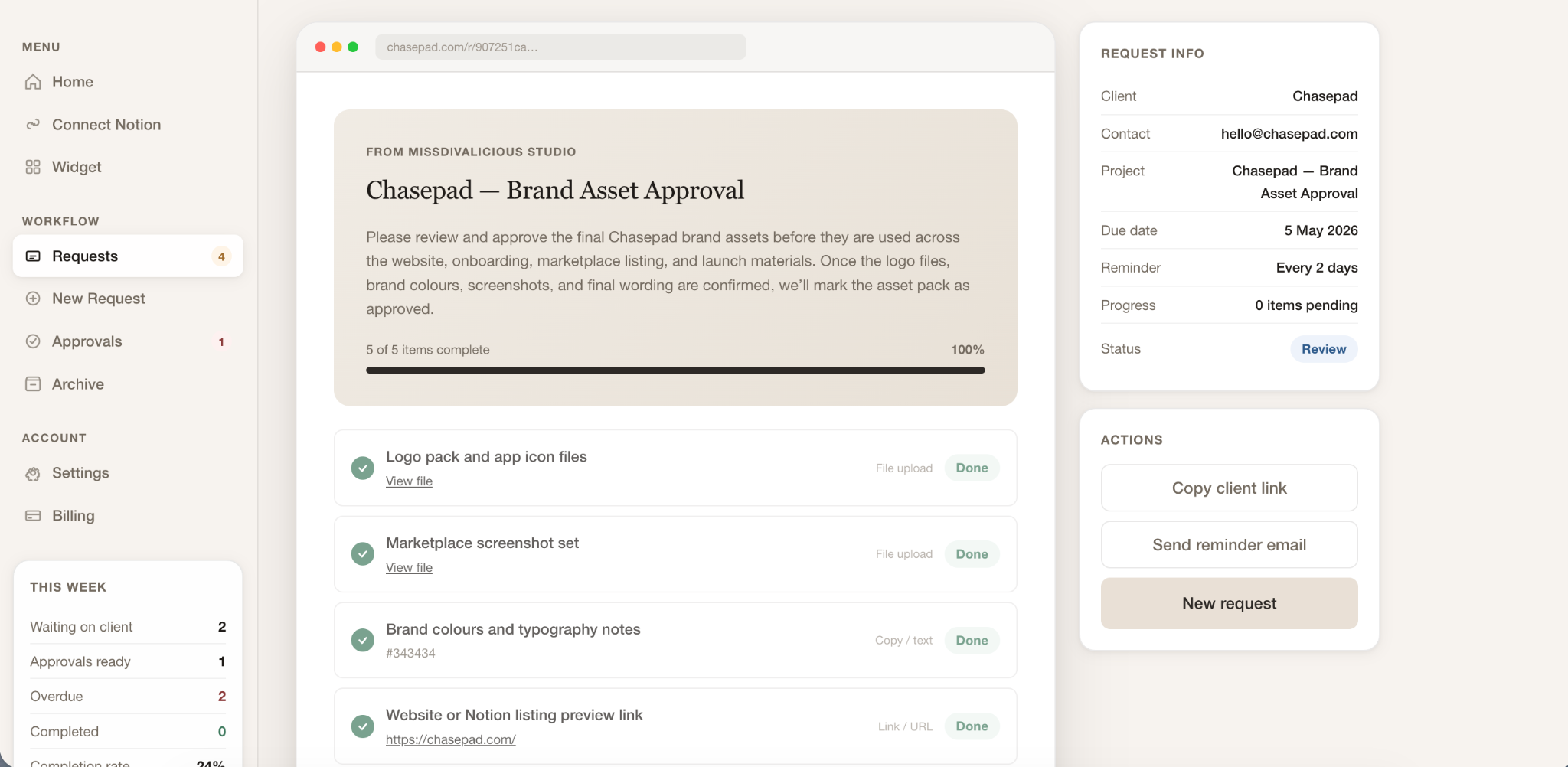
The best evidence is useful work already shipped: systems that make requests clearer, approvals easier to track and recurring operations less dependent on memory.

Chasepad dashboard showing a client link approval workflow.

Client approvals · Chasepad

Make the next request visible.

Chasepad brings client requests, files, approvals and feedback into a clearer flow so the team is not reconstructing progress from scattered messages.

Explore Chasepad →
Notion AI Agents workspace for turning business inputs into clearer next steps.

Information workflows · Notion AI Agents

Let useful structure start earlier.

Published Notion AI agents turn recurring inputs into clearer briefs, requests and delivery steps without asking teams to begin from a blank page.

Explore Notion AI Agents →

Questions, answered

A practical place to begin.

You do not need to arrive with a technical brief or a perfect answer. A clear conversation about what currently happens is enough.

Do I need to know what should be automated?

No. You only need to know where work feels repetitive, slow or easy to lose. Mapping the current process is part of the work, so we can identify the highest-value opportunity together.

Does every project use AI?

No. Predictable rules are usually better handled with standard automation. AI is introduced when a workflow involves unstructured information or useful judgement, and only when it makes the system better.

Can we usually keep our existing software?

Usually, yes. The aim is to connect and improve the tools that already fit your team before suggesting a replacement. Any change is considered against the workflow, not because a tool is fashionable.

What kinds of workflows can be automated?

Examples include lead and enquiry handling, client onboarding, document processing, internal handoffs, recurring reporting, dashboards, approvals, follow-ups and custom AI-assisted operations.

How is scope and timing determined?

We start with the workflow, its tools, people, edge cases and desired outcome. That mapping determines whether an audit, sprint or larger implementation is the right shape, along with a realistic delivery plan.

Why start with one high-impact workflow?

One well-chosen workflow creates a visible improvement, gives the team confidence and reveals what should happen next. Automating the whole business at once usually creates more complexity before the foundations are clear.

Start with the friction

Show me the workflow that’s wasting your time.

Describe what currently happens, where it gets stuck, and what the team keeps doing manually. You do not need a technical brief. We can start with the shape of the work.

Discuss your workflow

A useful first conversation is free. A clear scope comes before a build.